Skip to content

Attendance and fees for kids' coaches and parents

Every session, on the same page.

Sesslynx is one shared record of who attended and what is owed, for independent coaches and the parents who pay them. Mark it in a tap. The other side confirms. The balance keeps itself, and each class has its own chat.

On the web, iPhone, iPad and Android

Lyn the lynx kitten waving hello
4:30
PM
Leo · Piano
Marked present by Mr. Okafor
Waiting for parent
4:31
PM
Leo · Piano
Confirmed by Dana
Present · confirmed

The problem

Right now, everyone just tries to remember.

Independent coaches are paid per session, and different kids pay in different ways. Nobody keeps a shared record. That is how awkward money talks, missed payments, and disputes start.

How Sesslynx fixes it

One shared, trusted record.

Both sides look at the same sessions, the same statuses, and the same balance. Nothing counts until both sides have had the chance to agree.

  • Marked

    Either side marks attendance in under 5 seconds.

  • Confirmed

    The other side confirms or disputes. Silence for 48 hours means confirmed.

  • Balanced

    Each mark updates a live balance: confirmed and pending.

  • Stated

    A monthly statement both sides already agree with.

Step 1 · after class

Coach or parent marks the session

One tap, or swipe the ticket. Present, no-show, absent with notice, late cancel, coach cancelled or makeup.

Marked · waiting

Step 2 · the other side

Gets a notice to confirm

In the app, by push and by email. Until they answer, the charge shows as pending on both sides.

Please confirm

Confirm

Confirmed

It goes on the ledger and the balance updates for both sides.

Something's off

Disputed

Pick what actually happened and add a short note. The charge stays pending until you both agree.

No reply in 48 hours

Auto-confirmed

Silence counts as agreement, so nothing sits open forever.

A session is marked by either side, the other side is asked to confirm, and it then either goes on the ledger, stays pending while you settle a disagreement, or auto-confirms after 48 hours.

The app

The same record, on both sides.

Coaches see their day and their money. Parents see every kid, what needs them, and why they owe what they owe.

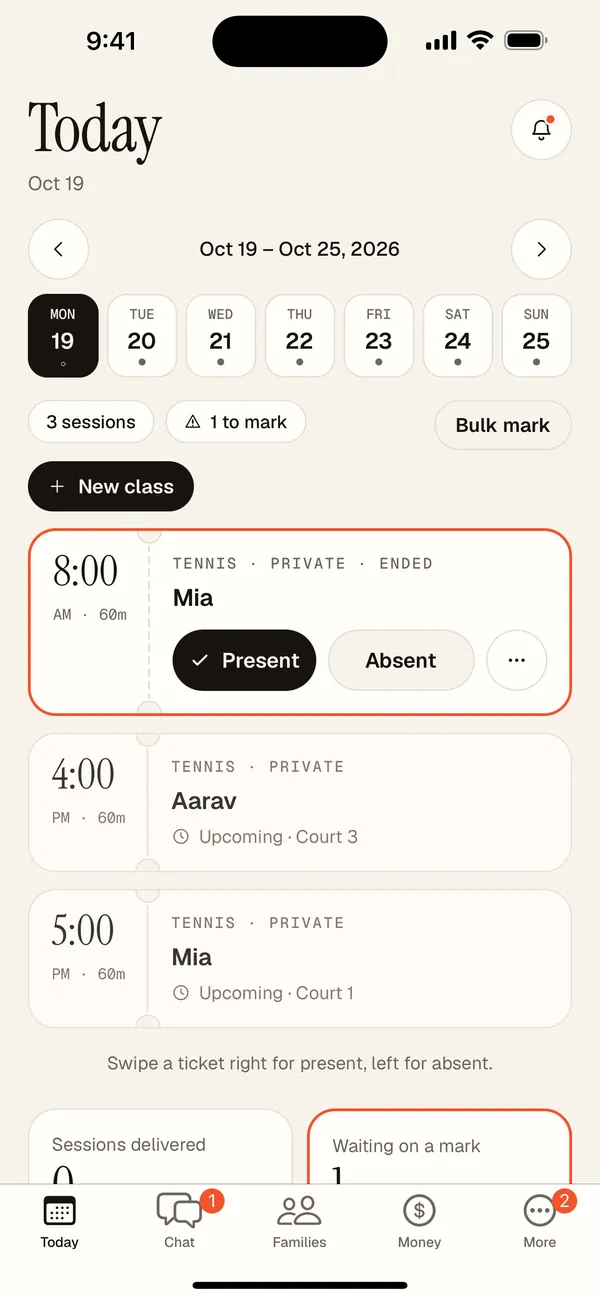
Coach Today screen with this week's sessions and one waiting for a mark
Coach: today's lessons, one tap to mark
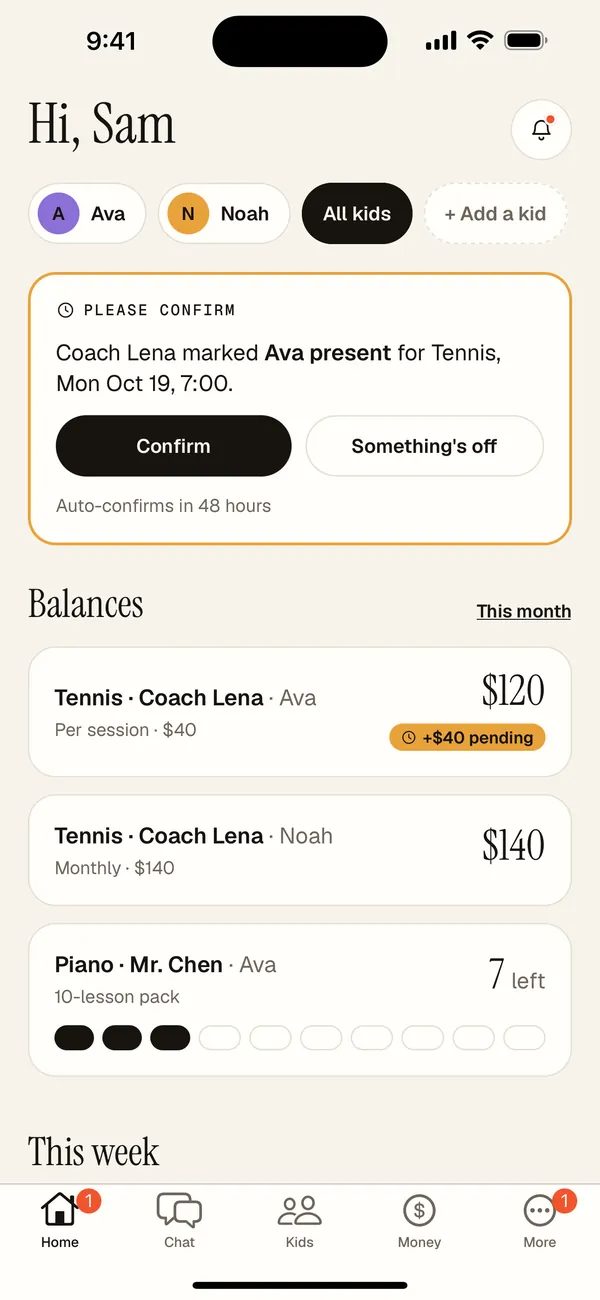
Parent home screen asking to confirm a lesson, with balances per kid
Parent: confirm, and see every balance
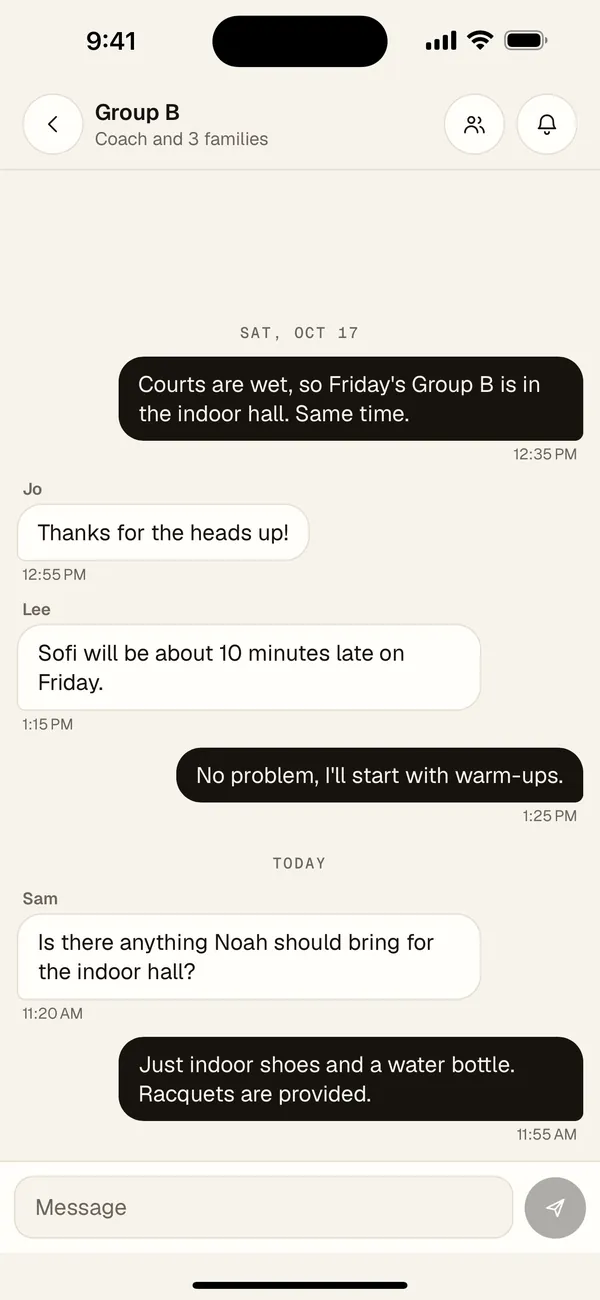
A class chat between the coach and the families in Group B
Class chat, per class
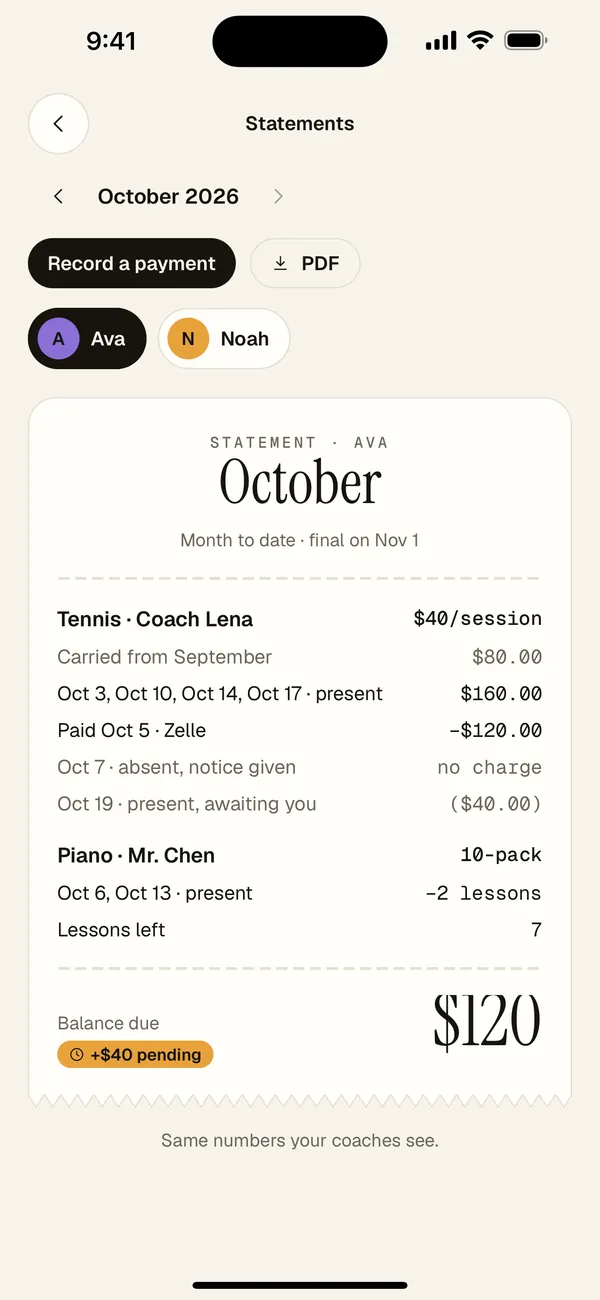
A monthly statement for one kid, receipt style
A statement both sides trust

How it works

Four steps. Then it runs itself.

  1. 1

    Add your class and rates

    Coaches add a class, the kids in it, and each kid's rate plan: per session, a package of lessons, or a monthly flat fee.

  2. 2

    Invite the family or the coach

    Send one invite link per family. Parents can start too: add a class for a coach who is not on Sesslynx yet, and they can claim it later. Parents can invite a co-parent.

  3. 3

    Mark in a tap. The other side confirms.

    Either side marks attendance in under five seconds. The other side gets a notice and can confirm or dispute. No reply in 48 hours means confirmed.

  4. 4

    Balances and statements take care of themselves

    Every mark updates a live shared balance. At the end of the month, both sides get the same statement. In between, each class has its own chat.

Features

Everything the notebook was trying to do.

All features
  • 01

    Mark in under 5 seconds

    Swipe or tap a session ticket. Present, no-show, absent with notice, late cancel, coach cancelled, or makeup.

  • 02

    The other side confirms

    Each mark sends an in-app and email notice. Confirm or dispute. Anything left alone auto-confirms after 48 hours.

  • 03

    Reminders before and after

    Pick a push before each session, from 10 minutes to 2 days ahead. After, unmarked sessions get a nudge that stops once anyone marks.

  • 04

    Rate plans per kid

    Per session, packages with lessons left, monthly flat, sibling or custom discounts, and your late-cancel and no-show policies.

  • 05

    A live shared balance

    Each kid in each class has one balance both sides can see, split into confirmed and pending.

  • 06

    Record any payment

    Log Zelle, Venmo, cash, or check. When a parent records a payment, the coach acknowledges it and it comes off the balance.

  • 07

    Monthly statements

    A receipt-style statement for both sides at the end of each month, with a PDF download.

  • 08

    Class chat

    One running chat per class with the coach and its families. History stays with the class, week after week.

  • 09

    Co-parents

    Invite your co-parent by link. You both see the same kids, balances, statements and class chats.

  • 10

    Guided coach setup

    About you, cancellations, rate plans, classes and families, in the right order. Edit any of it later.

  • 11

    Web, iPhone, iPad and Android

    One account everywhere. Split views on iPad and hinge-aware layouts on foldables.

  • 12

    Minimal kids' data

    First names only. In group classes and chats, parents see their own kid's name and nobody else's.

The Today list

Each session is a ticket.

Open the app after class and every session from today is there. Tap to mark it. Statuses use a color and a word, so nothing depends on color alone.

  • Present
  • No-show
  • Absent with notice
  • Late cancel
  • Coach cancelled
  • Makeup

Reminders until it's marked

  1. 1 hour afterA first nudge, while the session is fresh.
  2. 7pmAn evening reminder, if it is still unmarked.
  3. Next morningOne more, outside quiet hours.
  4. Daily digest, 2 daysOne batched message for everything still open.
  5. Then it stopsNo endless pings. The session shows in Needs attention.

One push per day, never one per class. Quiet hours from 9pm to 8am. Once anyone marks, reminders stop for both sides.

9:41100%

Tue · Oct 14

Today

  • 3:30
    PM
    Maya · Tennis
    Coach Ana · Court 2
    Present · confirmed
  • 4:30
    PM
    Leo · Piano
    Mr. Okafor · 10-pack, 6 left
    Marked · waiting
  • 5:15
    PM
    Maya · Swim
    Coach Ren · Lane 4
    Makeup
  • 6:00
    PM
    Leo · Math
    Ms. Patel · Monthly
    PresentOther
Leo · Piano balance
$120$30 pending
The Today list: each session is a ticket. Tap to mark; the other side confirms.

Class chat

One chat per class.

No more group texts where class news gets lost. Each class has its own conversation with only its coach and families, and the history stays with the class week after week.

How class chat works

Group B

Coach and 3 families · Live

  1. Sat, Oct 17

    Coach Lena

    Courts are wet, so Friday's Group B is in the indoor hall. Same time.

    12:35 PM
  2. Jo

    Thanks for the heads up!

    12:55 PM
  3. Today

    Is there anything Noah should bring for the indoor hall?

    11:20 AM
  4. Coach Lena

    Just indoor shoes and a water bottle. Racquets are provided.

    11:55 AM
Message
One running chat per class. Last week's messages are still there next week.

Private class · one kid

A private class chat: the coach and the kid's parent, plus their co-parent if they have one.CCoachClass chatAva's familySParentACo-parent
The coach and the kid's parent. A co-parent joins automatically.

Group class · every family

A group class chat: the coach and the parents of every kid in the class. Other families' kids' names stay hidden.CCoachClass chatSYouNoah's familyJParentAnother familyLParentAnother family
The coach and the parents of every kid in the class. You see your own kid's name; other families' kids stay private.

Co-parents

Two parents, one family.

Invite your co-parent with a link. You both see the same kids, balances and statements, either of you can confirm a lesson or record a payment, and you are both in every class chat.

SSam · Primary parent
AAlex · Co-parent
  • The same kids
  • Balances and payments
  • Monthly statements
  • Mark, confirm or dispute
  • Every class chat
  • The same updates
Invite your co-parent with a link. They join your family and see everything you see. The primary parent can remove a co-parent, and a co-parent can leave at any time.

Two sides, one record

Fair to both sides.

Pick your side at signup. If you coach and you are a parent, one account can hold both roles.

For coaches

Spend the last minute of class marking it, not the last day of the month reconstructing it.

  • A web desk with a week grid, roster, and balances
  • A needs-attention list and bulk mark
  • Rate plans per kid, packages, and your policies
  • Payments acknowledged, statements sent for you
  • A chat for every class, moderated by you
For coaches

For parents

Know what you owe and why, for every kid and every class, without asking.

  • All kids, all classes, all coaches in one place
  • Confirm or dispute a mark in a tap
  • A live balance you can check before you pay
  • Track coaches who are not on Sesslynx yet
  • Share everything with your co-parent
For parents

Why switch

The mess, and what replaces it.

  • The mess

    Two people trying to remember the same month.

    With Sesslynx

    One record both sides can see, updated as it happens.

  • The mess

    A text thread full of “was she there on the 12th?”

    With Sesslynx

    Each session is marked and confirmed within days, not weeks.

  • The mess

    A notebook of who paid by Zelle, who paid cash.

    With Sesslynx

    Payments are logged against the balance and acknowledged.

  • The mess

    Package lessons counted on fingers.

    With Sesslynx

    Packages show lessons left after every session.

  • The mess

    An awkward talk about money at pickup.

    With Sesslynx

    A monthly statement that both sides already agree on.

  • The mess

    Late cancels decided case by case.

    With Sesslynx

    Your policy is written down and applied the same way every time.

  • The mess

    A group text where class news gets buried.

    With Sesslynx

    One chat per class, with only that class's coach and families in it.

  • The mess

    Forwarding every update to the other parent.

    With Sesslynx

    Co-parents see the same kids, balances and chats, and get the same updates.

  • The mess

    Setting up a spreadsheet before the first lesson.

    With Sesslynx

    A guided setup: rules, rates, classes, families, done in minutes.

Pricing

Free to start. Fair to grow.

Coaches start free with up to 5 kids. Parents in classes with coaches on Sesslynx are free. Bigger rosters and families with many classes can pick Coach Pro or Family Plus.

See plans
  • Coach Free

    For coaches getting started

    Free

    • Up to 5 kids
    • Attendance marking and confirmations
    • Session reminders before every class
    • Live shared balances
    • Record payments
    • Class chat
    Start free
  • Coach Pro

    For coaches with a full roster

    $11.99/mo

    or $119.99/yr, save 17%

    • Founding coaches pay $79.99/yr, locked in while subscribed
    • Unlimited kids
    • Packages and punch cards
    • Monthly statement PDFs
    • Web desk with bulk mark
    • Class chat for every class
    Sign up for Coach Pro
  • Parent

    For classes with coaches on Sesslynx

    Free

    • Linked to your coach's class
    • Session reminders for each kid
    • Mark, confirm or dispute
    • Live balance per kid
    • Record payments
    • Monthly statements
    • Class chat and co-parent sharing
    Join as a parent
  • Family Plus

    For families with many classes

    $4.99/mo

    or $39.99/yr, save 33%

    • Classes with coaches not on Sesslynx
    • One hub for all kids
    • Statement PDFs
    • History merges when a coach claims the class
    • Covers both parents
    Sign up for Family Plus

FAQ

Questions, answered plainly.

Who marks attendance, the coach or the parent?

Either side. Whoever marks first, the other side gets an in-app and email notice and can confirm or dispute. If nobody responds, the mark auto-confirms after 48 hours.

What happens if we disagree about a session?

The other side can dispute a mark. The charge stays pending, not confirmed, until you sort it out. The balance always shows which amounts are confirmed and which are pending.

Will I get spammed with reminders?

No. Reminders are batched to one push per day, respect quiet hours from 9pm to 8am, stop for both sides as soon as anyone marks, and stop entirely after a few days.

Does Sesslynx move money?

No. Families pay the way they already do, by Zelle, Venmo, cash, or check, and record it in Sesslynx. The coach acknowledges it and the balance updates. We never see bank or card details.

My kid's coach is not on Sesslynx. Can I still use it?

Yes. With Family Plus you can track classes with coaches who are not on Sesslynx. If the coach joins later, they can claim the class and the history merges.

What do you store about my kids?

As little as we can: a first name and the sessions they attend. In group classes, parents only see their own kid's row.

Who is in a class chat?

In a private class, the coach and the kid's parent (and co-parent). In a group class, the coach and the parents of every kid in the class. Other families' kids' names stay hidden. The chat history stays with the class.

Can both parents use it?

Yes. Invite your co-parent with a link. They see the same kids, balances, statements and class chats, can mark, confirm and record payments, and get the same notifications.

Can Sesslynx remind me before a class?

Yes. In Settings, pick when you want a push: 10 minutes up to 2 days before, up to three times. Coaches can change it per class, parents per kid and class, and each co-parent sets their own. Reminders skip cancelled sessions, classes you've said you'll miss, and paused classes.

Can I be a coach and a parent?

Yes. You choose a side at signup, and one account can hold both roles later.

Put every session on the same page.

Coaches start free with up to 5 kids. Parents linked to a coach on Sesslynx are always free.

On the web, iPhone, iPad and Android

Lyn the lynx kitten cheering